Cut the ums, pauses & stumbles from your talking-head videos — automatically
Upload a video and every filler, silence, false start and retake gets flagged for you. Approve each cut, then export a clean video. Hours of editing — done in minutes.
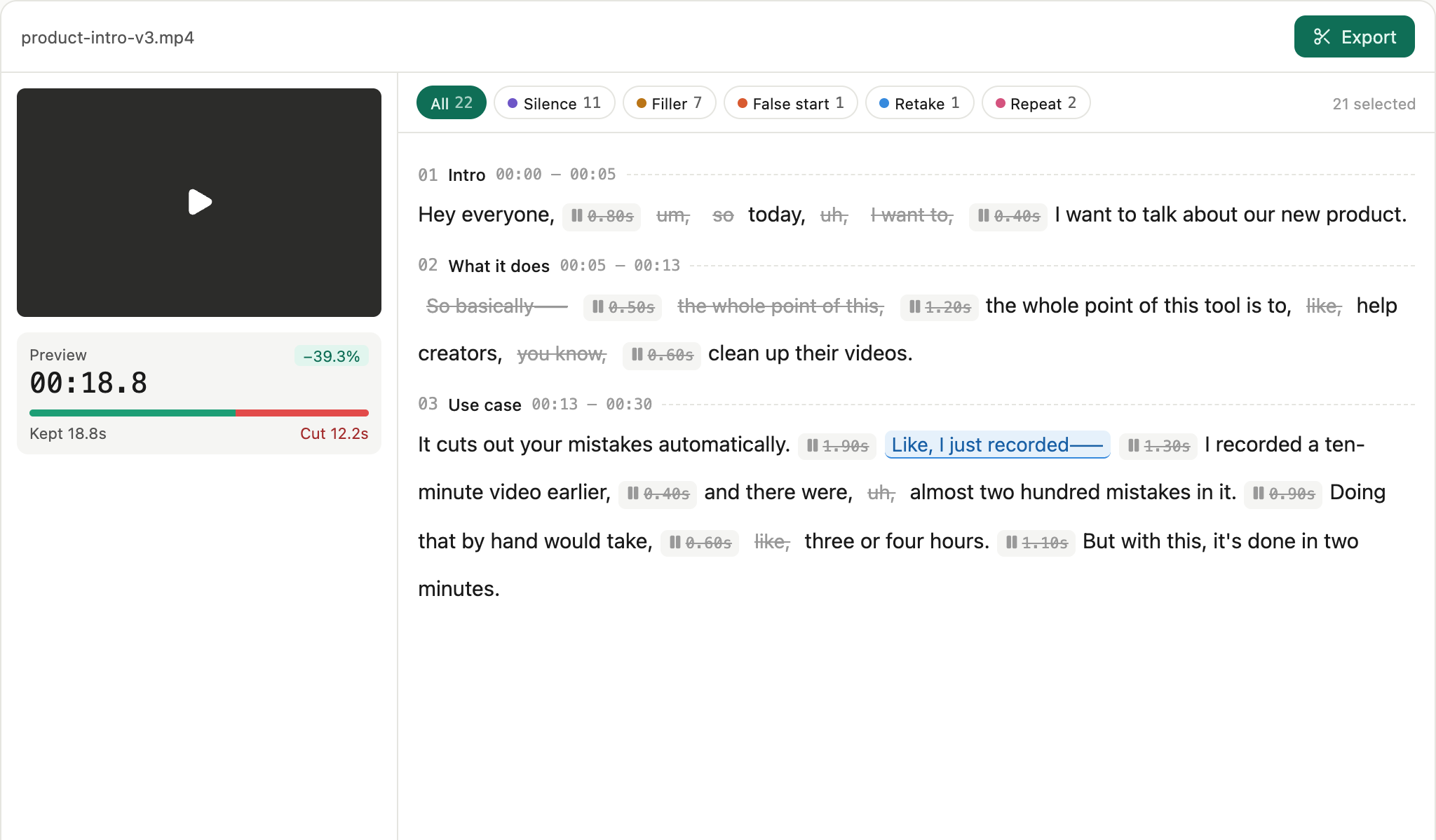
The worst part of editing talking-head video is cutting the filler
A 10-minute take can take hours to clean by hand — every "um", awkward pause, and re-recorded line. Generic editors miss the nuance; pro tools are overkill. You just want your point to land clean.
Three steps to a clean take
Upload
Drop in talking-head video or audio; it's transcribed word-by-word, in multiple languages.
Review
Suggested cuts appear inline; you click to keep or remove — you're always in control.
Export
Cloud render, download the clean cut. No watermark, audio stays in sync.
Built for talking-head
Every kind of cut
Silences, fillers, false starts, retakes, stutters — flagged inline with word-level timing.
Multilingual
English and Chinese today, with fillers, pauses and stumbles detected in each — more languages on the way.
You approve every cut
It only suggests. Judgement calls like retakes default to keep.
Video and audio
Talking-head video, podcasts, voice memos — audio exports as clean m4a.
Simple, transparent pricing
Billed by source duration: processing 1 minute of media costs 1 credit minute (charged at transcription). Review, export and re-export are free.
- Free processing minutes — the whole product, no card required
- Every cut type — silences, fillers, false starts, retakes, stutters
- Video & audio (MP4 / MOV / MP3 / M4A / WAV)
- Multilingual transcription, word-level timestamps
- Unlimited exports & re-exports
- SRT subtitles
- No watermark
- Minutes never expire
- 60 processing minutes (1 credit = 1 source minute)
- Every cut type — silences, fillers, false starts, retakes, stutters
- Video & audio (MP4 / MOV / MP3 / M4A / WAV)
- Multilingual transcription, word-level timestamps
- Unlimited exports & re-exports
- SRT subtitles
- No watermark
- Minutes never expire
- 300 processing minutes (1 credit = 1 source minute)
- Every cut type — silences, fillers, false starts, retakes, stutters
- Video & audio (MP4 / MOV / MP3 / M4A / WAV)
- Multilingual transcription, word-level timestamps
- Unlimited exports & re-exports
- SRT subtitles
- No watermark
- Minutes never expire
- 1200 processing minutes (1 credit = 1 source minute)
- Every cut type — silences, fillers, false starts, retakes, stutters
- Video & audio (MP4 / MOV / MP3 / M4A / WAV)
- Multilingual transcription, word-level timestamps
- Unlimited exports & re-exports
- SRT subtitles
- No watermark
- Minutes never expire
Every pack includes all features — you only pay for minutes, once. No subscription.
Why not CapCut or Descript
Understands talking-head
Detection tuned for it: tells a filler "like" from a meaningful one, so it won't cut what you meant.
Simpler than Descript
No full editor to learn — it does one thing, cutting filler, extremely well.
Get your next video clean
Upload → review each cut → export. Minutes, not hours.
FAQ
How does pricing work?
By source duration: processing a 10-minute video costs 10 minutes of credit (charged at transcription; unlimited exports). New accounts get free minutes; packs start at $9.9 for 60 minutes — see the pricing page.
Do I need an account?
Not for the demo. Uploading requires Google sign-in — your free minutes and purchases live on your account.
Which languages are supported?
Multiple languages — transcription with fillers, pauses and stumbles detected per language, for video and audio (podcasts, voice memos) alike.
Is my video safe?
Used only for this job and deleted automatically afterwards. No watermark, never used for training.